Wednesday, March 20, 2013

Next: Animated gifs


Dear class,

Our next weeks after the break will take us into an early form of digital animation called 'animated gifs':

Please read the Wikipedia entry above so that you are well-versed in the history of this form. Animated gifs existed long before Photoshop and the Web. Culturally, they are usually employed humorously, but many other uses have developed in both digital/new media art and in advertising. We will get into more elaborate examples of animated gif art as well as advertising in the coming weeks.


During our break, go online and search 'animated gifs'. Save links to your favorite examples and post them to your blog as a list. We will look at some of these and discuss them briefly next time we meet.

In the meantime, here are some examples and some ideas, as well as instructions for how to construct an animated gif in Photoshop:


via tom moody: http://www.digitalmediatree.com/tommoody/date/2004/12/21/


via tom moody: http://www.digitalmediatree.com/tommoody/date/2003/12/29/


Article: from Rhizome.org

GIFABILITY

Last winter, Dan Harmon, who was then the executive producer of the television sitcom Community, shared that he tried, “many times a season” to put star Alison Brie “in a situation, wardrobe-wise, that I know is going to end up as an animated GIF file!”[1] Those GIFs, which circulate on Tumblr and other social media networks that traffic in images, are frame-capture GIFs. Unlike other GIF types, frame-capture GIFs plainly collect and endlessly repeat a single pop cultural moment from movies, TV shows, sporting events, political occasions, newscasts, cartoons, or even video games. As GIFs are silent, text is used to share dialogue or help shepherd the meaning of a GIF. Frame-grab GIFs are low-quality, incessantly mobile things, they can be awkwardly cropped and their focus is always obviously legible. Somewhat counter to this are what Daniel Rourke has termed art GIFs,[2]which, while also frequently sourced from movies or television, contain higher resolutions and have a self-consciously highbrow pretension, usually focusing on subtler, “artistic” moments. [read in full]
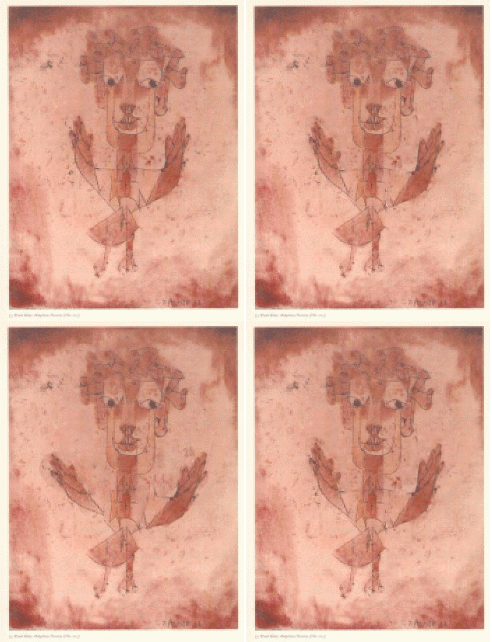
              Angelus Novus GIF by Garrett Rosenblum © Garrett, Inc. 2012

INSTRUCTIONS:
Create a folder full of images that you want to sequence together as frames in an animated GIF. You can find special programs online to do this, but we're going to do this in Photoshop:
  1. Put the images you want to animate into one folder.
  2. Click File > Scripts > Load Files into Stack. When the “Load Layers” window pops up, click Browse to select & open your image files, and then click OK. This should import the files you selected as individual layers in your document. Rearrange the layers into the correct order, if necessary.
  3. Open the Animation palette (Window > Animation) if you have CS5. In Photoshop CS6, this is now known as the Timeline palette. So, go to (Window > Timeline) instead.
  4. In the Animation/Timeline palette menu (found at the top right corner of the palette), click Make Frames From Layers. You can also click Reverse Frames if needed. This will take each layer in your document and set it as an individual frame in the animation.
  5. Now we will change the duration of each frame. Make sure you are in frame view, not timeline view. If you do not see thumbnail icons of all your layers in the Animation/Timeline palette, click the icon in the lower right corner (the hover text will say “Convert to Frame Animation”). Now, back in the Animation/Timeline palette menu, click Select All Frames.
  6. Click the drop down button just underneath each frame image (circled in red in the image below). This will bring up a menu where you can set a duration. Since all frames are selected, all frames will be set to the same time. Each frame can be changed individually, if desired.

  7. The drop down button circled in black in the image above will change how many times the animation will loop; either a fixed number of times, or forever.
  8. Once the frame order and timing as been set up, it is time to save the image! Click File > Save for Web & Devices, make sure the file format is set to GIF, change any other options if needed, and save the image!
You will now have an animated GIF taken from a folder full of the individual frames. In fact, as long as each frame exists as a separate layer in Photoshop, the Animation/Timeline palette can be used to create the GIF. 

Wednesday, March 13, 2013

Assignment #2: Billboard // Context


Image via


For the next two classes you will get to present your billboards. Upping the ante, in addition to showing us your finished billboard(s) and the several steps (including dead ends) that you took to get there, you'll also get to show us your finished billboard in a context or environment. Think about who your targeted audience is, and where your image belongs, whether it is public art, advertising, or a political message (etc).

In addition: write down the problems you have with certain tools so we can address them in class. Anything that frustrated your goals; also, if you found solutions to specific problems please feel free to share!

Also, here are several very short Photoshop tutorial videos, including one that covers the content-aware tool, puppet warp, and a few more things:


Tuesday, February 26, 2013

Assignment #2: Billboard


CREATE A BILLBOARD

Starting today and for the next TWO (2) weeks, we will work to produce a billboard using several images, working with masking, merging and text layers.

IDEAS: Your "advertizement" can be for ANYTHING YOU WANT. 

GOAL: to make a convincing case for something (anything) through a visually striking, clever design. You may incorporate text elements or leave them out. You may use found images if you transform them.

EXAMPLES / THEMES: 

- a philosophical concept (World Peace)
- your own artwork or business
- a real product (selling used laptops; publication of a cookbook with your grandmother's recipes)
- a fake, made-up product (robotic goldfish pets; super-peanut butter that makes you smarter....)
- a political cause (Ban Fracking; Promote Internet Freedom; etc, etc)
- something not listed here....


RESEARCH: before embarking on creating your billboard, spend some time looking at both conceptual/public art billboards and actual advertizing billboards online and in the city. Consider their use of text, size, proportions, message, pitch, and methods of manipulating the viewer or subverting conventions. Think about comfort zones and pushing past them. Think about the differences between advertizing, political activism and art.

Here are some sites with examples that you may find invigorating:

CONCEPTUAL / PUBLIC ART
How Many Billboards? Exhibition at the MAK Center for Art and Architecture
Check out the artists' billboards:
http://www.howmanybillboards.org/artists.html

The Absent Body: Felix Gonzalez-Torres, AIDS, Homosexuality and Representation (The Great Within: desire nostalgia art film photography mass culture)

Takin’ It To The Streets. An Interview With Susan Silton (artpulse)

High Line Art (commissions and produces public art projects on and around the High Line)
http://www.thehighline.org/about/public-art

Article: Billboard Art (Theory Now)

STRAIGHT ADVERTIZING
40 Conceptual Print Ads

25 Inspiring and creative print ads

eyeballnyc


HELP:
If you are feeling stuck, here are a few more [CS5] tutorials that may help:
https://www.adobe.com/support/photoshop/gettingstarted/

Wednesday, February 13, 2013

RiP! links and some notes


hi everyone,

I'm glad you liked the film. If you want to view it again, you can download it for free or view parts of it online. here are links and some background info:

Wikipedia entry;

Website:

Name your price:

Rent or buy on iTunes:

Downloads:


Some info for next class:

- Since we are on a Monday schedule next week, there will be no 2D Imaging class next Wednesday, Feb. 20th.

- Your Assignment #1 will be due the following week, Feb 27.

For this assignment, you'll have completed THREE images that you deem 'final'. They can all be interrelated, or remixed from one another, but they must each be substantially different. You can decide how: mood, meaning, etc behind each one.

From these three final images, choose the one you feel is the 'best' or most successful. When you present the three images in class, we can talk about what 'best' means. We will discuss aesthetic criteria, as ell as ideas behind images.

This will lead us to Assignment #2, where we will produce two image: an advertisement and an artwork. More on that later. 

I will also demonstrate several nifty tools that came new with CS5: the 'Spot Healing Brush' and the 'Context Aware' set of parameters.


+++

Wednesday, February 6, 2013

Exhibition: The Public Private


LOCATION

66 Fifth Avenue at 13th Street
New York

GALLERY HOURS

Open daily 12:00 noon - 6:00 p.m. and late Thursday evenings until 8:00 p.m.; closed on all major holidays and holiday eves. Admission is free.

GALLERY CLOSINGS:

Spring 2013:
  • Monday, February 18 (Presidents' Day)
  • Sunday, March 31 (Easter)


Via: http://www.newschool.edu/parsons/subpage.aspx?id=88126


THE PUBLIC PRIVATE

Sheila C. Johnson Design Center
Anna-Maria and Stephen Kellen Gallery
February 7 - April 17, 2013
Opening reception: Wednesday, February 6, 6:00 - 8:00 pm
The Public Private will be the first New York exhibition of contemporary art to explore the impact of social media and new technologies on the relationship between the public and private realm. The artworks brought together in The Public Private—several presented for the first time in the United States—address these issues from psychological, legal, and economic perspectives and use strategies ranging from hacking to self-surveillance to reflect upon the profound changes in our understanding of identity, personal boundaries, and self-representation. 
Works on view include Paolo Cirio and Alessandro Ludovico’s Face to Facebook, a multimedia installation of one million Facebook profiles, which were appropriated” by the artists, filtered using facial-recognition software, and then posted on a custom-made dating website sorted by facial expressions. Eva and Franco Mattes’ The Others is a video installation composed of 10,000 photos the Mattes have acquired through a software glitch that gives remote access to personal computer files. The core of the work is not just the presentation of these images, but the act of “stealing” and moving them from the private into the public realm. 
Other artists and works represented in the gallery include Jill Magid’s Evidence Locker, Luke Dubois’ Missed Connections, Wafaa Bilal’s 3rdi, Carlo Zanni’s Self Portrait with Friends, James Coupe's Panoptic Panorama #2: Five People in a Room, Paolo Cirio’sStreet Ghosts, and Ben Grosser’s Facebook Demetricator. 
The Public Private is curated by Christiane Paul, an Associate Professor in the School of Media Studies at The New School and Adjunct Curator of New Media Arts at the Whitney Museum of American Art.

Media contest for New School students:
New School students may enter our student time-based media contest YOURS, MINE, AND OURS IN THE AGE OF SOCIAL MEDIA.  Contest rules and information may be downloaded here:
The deadline is March 15, 2013, 12:00 NOON.

Sunday, February 3, 2013

Found Art, Collage, Appropriation... and some tutorials


First things first: Photoshop tutorials

Deke McClelland's Photoshop CS5 (one-on-one) video lesson tutorials
:


+++++
 
So, here are few things to think about when taking images from the web (or anywhere for that matter) when making art:

Copying and Changing the Source Image

Reproducibility is a central trait of digital media. Unlike older "analogue" mediums of mass production such as print-making (lithographs, silk screen, etching, etc), vinyl records, cassette tapes, videotapes, printing and publishing books, or even photographic prints, digital technologies allow us to make an exact replica of something, or at least an exact replica of it's appearance. If the original is a one-of-a-kind object, like a painting, then the replica is merely a "reproduction". But with certain media, such as photography and music, it is difficult or nearly impossible to discern the difference between a "copy" and an "original" - in other words, there can be multiple copies, each of which is equally an instance of the work.

This is true for digital photograph files, CDs, MP3s, DVDs, and all web media. From sampling to mashups, collage to subvertisements, contemporary artists, designers and content creators use and re-purpose pre-existing works as source material for the creation of new works, using digital technologies. If these works truly transform their source material, which often includes parts of copyrighted works, they are considered new and "original". In the digital age, new works are often created when more than one existing work is recombined in a new way, providing new visual relationships and new ideas.

Copyrighted content can be used in a new work of art because such creative use falls into the category of "fair use". Under the fair use portion of copyright law, limited copyrighted material can be used for transformative purposes (creating a new work of art) as well as for closely commenting upon, criticizing, or parodying the source material.

Andy Warhol


Appropriation is a word that is used by media artists to describe the visual or rhetorical action of taking over the meaning of something that already exists and is already known, by way of visual reference. 

For example, Andy Warhol famously appropriated the Campbell’s soup can's appearance to make large, iconic silkscreen prints. Warhol’s soup cans are an interpretation of the physical object. The visual reference to the original soup can is important, as the viewer needs this information in order to understand what meanings the new work might convey (this could range from a feeling associated with a popular American icon of comfort food, to repulsion at the commodification of domestic life). By transforming the size and graphic palette of the soup cans, as well as the context in which the viewer will encounter them (an art gallery as opposed to a grocery store), an advertizing logo and its significance as a cultural artifact become are called into question.
 
In art as well as design, the interpretation of the viewer is what "completes" the work.
 
A few images and artists to consider:
John Heartfield (1891-1968) Front Cover, photo montage. 

John Heartfield originally produced photomontages for Arbeiter Illustreite Zeitung (AIZ) in Germany.  Heartfield (born Helmut Herzfeld; 19 June 1891 – 26 April 1968) was a pioneer in the use of art as a political weapon. His photomontages were anti-Nazi anti-Fascist statements. Heartfield also created book jackets for authors such as Upton Sinclair, as well as stage sets for such noted playwrights as Bertolt Brecht and Erwin Piscator.

'L'Egypte de Mlle Cleo de Merode cours elementaire d'histoire naturelle' by Joseph Cornell (1940). 

Joseph Cornell (December 24, 1903 – December 29, 1972) worked almost exclusively in the art of assemblage. He called his works boxes, and they contained found objects, which Cornell usually found in used bookstores and junk shops.
RAUSCHENBERG, Robert: Retroactive I, 1964, Oil and silkscreen ink on canvas. 84 x 60 in. (213.4 x 152.4 cm). Wadsworth Athenuem, Hartford, Connecticut. 

 Robert Rauschenberg (October 22, 1925 – May 12, 2008) was an American artist who came to prominence in the 1950s transition from Abstract Expressionism to Pop Art. Rauschenberg is well-known for his "Combines" of the 1950s, in which non-traditional materials and objects were employed in innovative combinations.


James Rosenquist (born November 29, 1933), I Love You with My Ford, 1961. Oil on canvas, 6 feet 10 3/4 inches x 7 feet 9 1/2 inches. Moderna Museet, Stockholm. © James Rosenquist/Licensed by VAGA, New York. 

Rosenquist has said the following about his involvement in the Pop Art movement: "They(art critics) called me a Pop artist because I used recognizable imagery. The critics like to group people together. I didn't meet Andy Warhol until 1964. I did not really know Andy or Roy Lichtenstein that well. We all emerged separately."

His specialty is taking fragmented, oddly disproportionate images and combining, overlapping, and putting them on canvases to create visual stories. This can leave some viewers breathless yet others confused, making them consider even the most familiar objects (a U-Haul trailer, or a box of Oxydol detergent, etc.) in more abstract and provocative ways.

http://wwol.inre.asu.edu/.images/barbara_kruger.jpg

Title:  You Are Not Yourself

Medium: Photo collage

Size: 182.9 x 121.9 cm


Kruger is a conceptual artist and film critic. She received her education from Syracuse University, Parsons School of Design, and the School of Visual Arts in New York. Early in her art career, she was a graphic designer, art director, and picture editor in the art departments at Mademoiselle, House and Garden, and other publications. This greatly influenced her later work as an artist. Her highly recognized style combines images and text addressing cultural representations of power, identity, and sexuality while challenging stereotypes and clichés.


Kenneth Tin-Kin Hung: Occupy Wall Street posters http://www.tinkin.com/arts/occupy-wall-street/ 

Kenneth Tin-Kin Hung (Chinese: 洪天健; pinyin: Hóng Tiānjiàn, born 1976) is a Chinese-American new media artist who lives and works in New York. Hung's works are digital collages of popular culture and current events. His media includes hi-definition video animation, video games, net.art, digital graphics and mixed-media installations. Hung has been called the "John Heartfield of Digital Era".


Andrea Champlin is a painter who lives in NYC. She uses digital media and methods of appropriation in her work, which can be found here: http://andreachamplin.com/

Tuesday, January 29, 2013

First Assignment

-->
2D IMAGING: THINGS YOU NEED TO DO ASAP----->
1) Email me your blog’s URL: joy.garnett@gmail.com
2) Start a blog in Blogger.com and personalize it. Assignments for this class, including sketches for ideas, will be posted to your blog. You will present these to the class when ready.
FIRST ASSIGNMENT--->
BE PREPARED TO WORK ON THIS FOR THE NEXT TWO TO THREE WEEKS
Find images (as many as you like) in the following "conventional" pictorial categories on the Internet and save them to a folder: they can come from any source (advertizing, news, museum sites, etc.)
1) landscape;
2) portrait;
3) interior scenes;
4) still life;
5) a famous painting of your choosing, any artist from any era.
6) other: crowds, the figure, abstractions, microscopic imagery, astronomical images..... etc.

Work at combining (remixing) parts taken from these images into one (or more) new images. It’s up to you how you want to change all the parts, what to discard and what to keep, and how you combine them using the tools in Photoshop. Feel free to also try tools we haven’t yet worked with in class. Experiment, make mistakes, be brave, and have fun. Think about what kind of image you want this to be in the end, but take as many experimental routes in getting to your goal as you want. Look at other art online or in books or magazines. Feel free to change your intentions and objectives at any point. Be prepared to discuss these changes and ideas in class.
Make as many new versions as you like, and save them all as .psd to a personal folder for future use.
Finally, when ready, choose the image you wish to put forward as your final project outcome. Consider this image to be an artwork, as opposed to just sketches or an assignment. Continue to work on it until you are satisfied.